
In the past, hiring managers have spent hours manually entering information into their applicant tracking systems (ATS). That has now changed dramatically with recruiting process automation, thanks to automation that’s integrated into an applicant tracking system.
What is recruiting process automation?
According to our colleague, Jieyi Zhang, there are several components to automation. First, there are tasks like sourcing, screening, notetaking, scheduling, and even feedback collection. Then, there are reports, which summarize what happened in a certain stage of the interview process. These two sets of functions are typically called workflows.
“[Process] automation refers to software or rules (often AI) that advance work connected to a larger goal — such as hiring,” Jieyi wrote in his article titled “The Recruiting Workflow Lifecycle” for CIO.com. “A single function — such as notetaking or scheduling — might be automated with either a point tool (e.g., a video conferencing application) or via a dedicated automation workflow.”
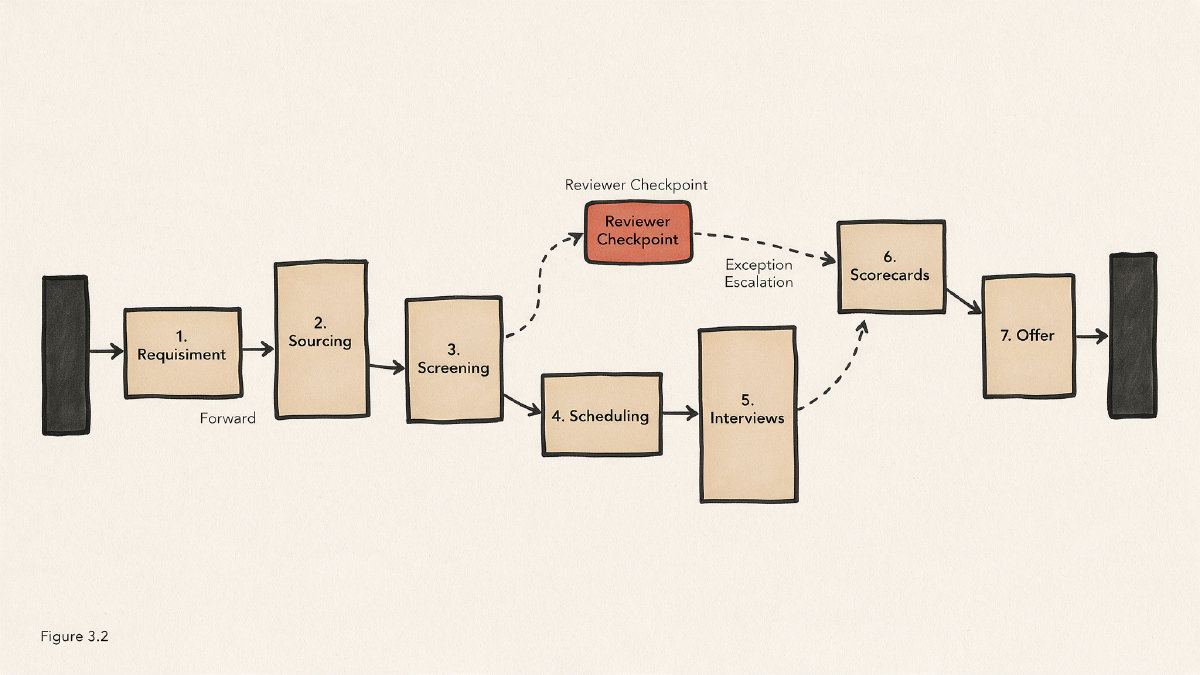
There are many aspects to automation, including:
-
Sourcing
-
Screening
-
Notetaking
-
Scheduling
-
Feedback collection
-
Reporting
-
Automatic workflows
-
Connected stages
-
Persisted context
-
Triggered next actions
This isn’t to say every step of the hiring lifecycle can be automated. But it means that the more connections you can make within your workflow, the easier it will be for automation to take over.
Jieyi described how each phase of the hiring cycle could incorporate automation:
Requisition-era pipeline building: A recruiter may draft a job posting, send it out through the ATS, and track candidate responses using reporting features. An AI-powered tool can then screen candidates against job descriptions and automatically forward the best matches for further evaluation.
From post-interview handoffs to offer: The offer itself can be sent from the ATS to the candidate via email, or another AI tool can help generate personalized messages. After an interview, some of the notes taken can be transcribed and stored, allowing for quick access later.
Analytics: Reports summarizing the entire recruitment lifecycle become part of the analytics suite, offering deep insights into how different sources perform, how quickly applicants move through the hiring funnel, and other metrics useful to optimizing the overall hiring experience.
While the above example shows one approach to automation, there’s another approach that uses individual point tools to speed up isolated tasks. For instance, one company might use a specific application that helps automate outreach. Another company may rely on a filtering tool that reduces the number of applicants they receive before an interview. Still others may rely on meeting booking tools that streamline scheduling interviews.
These tools aren’t inherently better or worse than process automation. They’re just different approaches that serve different needs at different points in the recruiting lifecycle.
Where automation should live
Automation can reduce administration by eliminating redundant steps. If an applicant applies to your job listing and provides all the required information, there’s no need to ask for that information again. This saves time for everyone involved in the hiring process.
When automating these basic tasks, however, companies should understand that people still need to maintain oversight. “Some tasks require judgment and insight,” said Jieyi. “That’s where people excel.” It’s important to distinguish between mechanical support (transcription, scoring, ranking, scheduling, etc.) and decision-making calls.
AI is already being used to summarize, score, rank, and schedule. However, people must still decide whether to advance, reject, offer, or hire a candidate. That includes decisions about whom to advance in a particular role and how to interpret nuances in the interview context. While AI improves the decision information available to recruiters, humans must make the final call.
For organizations considering an initial automation pilot, it’s important to evaluate current workflows. Where are the bottlenecks? Which parts of the hiring lifecycle would benefit most from automation?
If a team chooses to automate one task, such as AI-based notetaking, they should ensure the right tools are used. In addition to outlining what automation does, Jieyi describes how an organization should approach implementing automation.
“The key difference between automation and manual effort is that the former moves the workflow itself, rather than speeding up a single task,” Jieyi wrote.
An ATS-native solution
Many HR professionals rely on an applicant tracking system to automate various parts of the recruiting lifecycle. Some of those tasks are also native capabilities of an ATS.
However, not all ATS solutions include all possible automation features. For example, Greenhouse includes native scorecards and basic self-scheduling. Similarly, Lever supports automated outbound outreach alongside basic scheduling. Vendors vary, however, in how deeply they support complex, high-volume panels.
In cases where a company finds that its current ATS lacks certain automation capabilities, it may choose to supplement it with a dedicated solution. When selecting automation tools, companies should think about what functionality they need.
Are you looking for AI-based notetaking or structured scorecards with write-backs to your ATS? Do you need AI to automate sourcing efforts, or do you simply want to filter incoming applicants based on predefined criteria? Are you looking to manage scheduling panels?
In many instances, automation simply works best when used in tandem with a robust ATS. For instance, Workable allows companies to add external applications that integrate with their own systems. Alternatively, Greenhouse allows users to select third-party apps to augment existing capabilities. Both options are valid and appropriate.
Still, companies should be wary of integrating too many separate applications together, especially if they don’t speak to one another. Doing so can complicate data entry and lead to fragmented processes.
Rather than choosing between an ATS-native solution or a standalone point tool, it makes sense to consider the strengths and weaknesses of each. An ATS is sufficient for many tasks, though some organizations opt for best-of-breed tools instead. When the two fail to interoperate, it may be necessary to invest in integrations rather than treating them as optional.
Regardless of the path an organization takes, there are four key considerations to remember when evaluating automation tools:
-
Does the tool have the ability to connect the workflow?
-
How much supervision is required? What happens when something goes wrong?
-
What kind of access controls exist? Can you control who sees what? Is this information auditable?
-
How well does the automation fit into the existing technology stack?
Don’t compare tools based on feature counts alone. Instead, determine whether each tool offers the workflow capability, supervision burden, exception handling, and access controls necessary to meet your organization’s objectives.
Measuring results
Before rolling out any new automation tools, it’s important to define exactly what you hope to achieve. What do you expect to gain by reducing manual labor? Will faster hiring cycles be achieved?
To measure outcomes accurately, it’s helpful to define what success looks like before deploying automation and then measuring performance after rollout. Rather than simply comparing pre- and post-automation metrics, compare same-workflow metrics before and after. Use the same criteria to assess speed, quality, conversion, capacity, and the effectiveness of different sources in your hiring funnel.
It’s also essential to capture the impact of automation on the candidate experience, which affects the success of the hiring process. Companies that communicate clearly about what’s happening throughout the hiring lifecycle tend to provide a far better experience for candidates. Unfortunately, when pieces of the hiring funnel fall apart, that creates confusion.
For instance, candidates may get a thank-you message after applying. Then, they may see a message saying they’re moving forward with the position, followed by yet another indicating what’s coming next. If they’re asked to respond to questions after an interview, they may never hear back. All of this causes delays and leads to inconsistent experiences.
Candidates who are rejected may never hear back, which can affect employer reputation. On the flip side, a positive experience with the hiring process increases retention among candidates and hires.
Governance controls
Just as automation can help streamline the hiring process, it introduces risk. Organizations should implement controls to minimize risks to their hiring teams while maintaining the benefits provided by automation.
One of the greatest challenges with AI-driven automation is ensuring accountability. Every action must be auditable, reversible where appropriate, and traceable back to a defined owner. At the very least, a company should identify who is responsible for making key decisions, and document what was done.
Other governance controls include visibility into the hiring process. Organizations should establish escalation paths so that any issues can be resolved quickly. In fact, some companies create internal roles to handle exceptions or problems during the hiring process.
Access to the data should be carefully controlled. While HR professionals may be authorized to view the hiring process in its entirety, other stakeholders may only see portions of it. There’s a lot of power in controlling access to the hiring process.
Finally, companies should protect the integrity of their hiring process. Ensuring that candidates are evaluated consistently requires careful consideration of data-quality controls. Data that lacks consistency may replicate bias, or be based on flawed information.
Automation’s potential is vast. With the right tools and implementation strategies, organizations can reduce administrative burdens, accelerate the hiring process, and improve the candidate experience.
Still, vendors’ productivity figures should be viewed as claims rather than guaranteed outcomes. While 40–60 percent of recruiter time may be spent on administrative functions, and vendors may claim the same headcount can handle twice as many requisitions, the actual outcome remains unclear. In Asymbl’s Customer Zero deployment, its recruiter agent, Rosa, helped the firm hire 100 people in 100 days. That translates into 17,000 applications, 1,800 pre-screened candidates, and 800 interviews. A single product could result in an ROI of 152x. Obviously, these numbers vary depending on the industry, but these vendor-reported numbers remain worth considering.