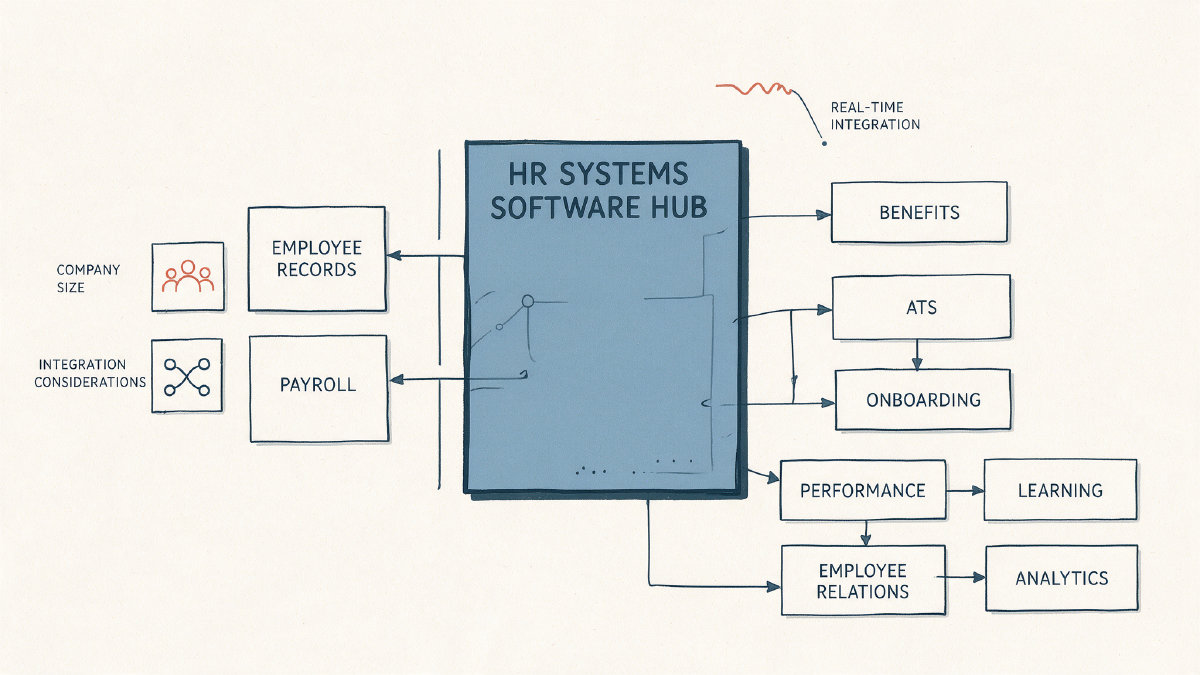
The HR systems software category is an interconnected set of products for managing a company’s workforce, employee records, payroll, benefits, hiring, onboarding, performance, learning, and other elements of the employee experience. It’s not a single product, though some vendors might offer all-in-one packages that bundle several applications together.
Buyers typically approach this category by identifying what processes they want to manage, then mapping out how their internal teams will use the tools. Buyers can choose between purchasing from a vendor that provides several related functions (an HRIS) or buying separately from vendors who specialize in different aspects of human resource management, such as talent acquisition, compensation, or learning.
HR systems software comes with various acronyms, including HCM, HRMS, and HRIS. However, there’s significant overlap among these terms, which often leads to confusion about what each entails. The best way to avoid the pitfalls of these misused terms is to inspect what the vendor offers rather than rely on labels.
This article describes how buyers should evaluate HR systems software before selecting vendors and implementing solutions. We’ll also explore common questions that arise when evaluating HR systems software.
What Are the Types of HR Systems Software?
The term “HRIS” refers to a human resource information system, and it remains one of the common labels used for HR technology. Today, “human capital management,” or HCM, is also widely used to describe broader suites that include HRIS functionality but add capabilities such as talent management and global features.
Another common acronym is HRMS, or human resource management system, which typically covers HRIS functionality plus payroll and time/labor management. Many HRMS providers also include HCM capabilities, such as talent management and global features like multi-lingual requirements, multi-currency, country-specific formatting, and localization, though not every HRMS includes them.
Other specialized modules may be included in an HCM suite, or they may be purchased separately. Here are examples of what each handles:
Payroll and compensation: This function enables users to create and distribute paychecks and bonuses. Payroll and compensation also supports other forms of compensation such as incentives and total rewards, allowing employees to trade one form of compensation for another, such as cash versus flexible spending accounts.
Benefits administration: Benefits include medical plans, life insurance, retirement savings programs, and others.
ATS and recruiting: An applicant tracking system automates candidate screening and interviews, while a recruitment tool helps identify candidates who fit specific skills, locations, and so on.
Onboarding: Onboarding systems automate digital forms and track tasks to ensure new hires receive proper training. An onboarding module should support digital forms, task tracking, training modules, document management, and communication.
LMS (learning management systems): These tools allow businesses to create, deliver, and manage training programs. They provide reports to help measure learning outcomes and enable continuous improvement. LMS systems can be used internally to train employees or externally to teach customers and other stakeholders.
Performance and people management: Many companies require that managers evaluate employees’ work regularly, either monthly or quarterly. People analytics, meanwhile, uses data to improve productivity, reduce attrition, and identify top performers.
Employee relations case management: Employee relations systems manage cases that arise during normal employment, such as disputes over wages or vacation time. Workplace investigations are a separate area within employee relations systems, as are anonymous reporting systems and workplace investigations.
Workplace investigations: This function handles formal investigations when an employee is accused of misconduct, such as harassment.
Anonymous reporting: Companies often have anonymous reporting mechanisms through which employees can report problems without revealing their identities.
People analytics: Analytics tools collect and analyze data to improve productivity, cut down on turnover, and find high-performers.
What Does HR Systems Software Architecture Look Like?
Most HR systems software platforms offer two architectural options: integrated suites of features or collections of individual functions known as “best-of-breed.” Each approach carries trade-offs that affect operations, cost, scalability, integrations, and reporting.
Integrated suites
Integrating the entire HCM stack allows organizations to run all the processes they need under a unified framework, reducing implementation efforts and costs. But integrating multiple applications increases the chances of technical debt because you’re tying together different sets of codebases. If the organization requires deep expertise in a specific area, however, the extra investment can yield dividends.
Best-of-breed systems
By definition, a collection of best-of-breed applications doesn’t tie all the pieces together. Instead, each application specializes in its particular domain and integrates with others using APIs or middleware. Best-of-breed solutions give users flexibility to pick the right mix of applications and integrate them independently. But building integrations between different applications is complex and costly, and maintenance requires ongoing coordination.
How Does Company Size Affect HR Systems Requirements?
Company size significantly affects the required workflows, and therefore the selection of HR systems software. While some vendors position themselves against large enterprises, most offer solutions designed for small- to mid-sized businesses instead. Vendors rarely define tiers or rankings for their products, and the distinction isn’t always useful anyway.
Small teams
For small business teams, limited bandwidth means keeping things simple is essential. At minimum, you probably need basic accounting tools like payroll and benefits to keep running, plus some kind of employee records. You won’t have the time or resources to maintain administrative overhead, so any HR systems software you purchase should streamline your operations and minimize the burden.
Mid-sized teams
For mid-sized teams, the focus shifts toward efficiency. Employees expect manager enablement, and leaders want a good idea of what their workforce is doing. You’ll need scalable workflows that can expand quickly if necessary, while still maintaining consistent processes. Mid-sized teams tend to be fairly agile and responsive, making them ideal candidates for HR systems that evolve quickly.
Enterprise
At enterprise scale, many companies operate across multiple locations, meaning HR systems software must accommodate remote and hybrid workers as well. There’s no question that enterprise-scale companies process far more requests than smaller ones do. Consistency becomes important, as does configurability. As you scale up, your ability to connect and manage multiple applications becomes critical, and so does the ability to integrate widely with other departments.
Multi-location needs
Finally, companies with international offices must select HR systems that understand and accommodate local laws and regulations. Some systems offer multilingual capabilities or localized versions, ensuring compliance in different regions.
How Should I Evaluate an HR Systems Solution?
It’s tempting to simply go to a vendor’s website and begin comparing the features offered. Instead, you should evaluate HR systems solutions based on how they fit into your existing infrastructure, the ease with which you can implement and scale, and whether they’ll truly benefit your employees and your business.
You should ask:
Which functional modules do you need? Identify what functions you must implement and prioritize those areas where you want deeper specialization. For example, if you need help with hiring, you should compare vendors who excel in that particular niche.
Do you need a solution with robust employee self-service? Self-service solutions allow employees to request and view information, and even apply for benefits or update personal information without assistance. Managers may also benefit from employee self-service capabilities, especially if they need help accessing employee records or requesting leave days.
How well does your company’s reporting needs match the HR systems provider’s offerings? Do you already have reporting systems in place, or do you need help building one? Be sure the reporting capabilities match your expectations, including the ability to export, customize, or share reports.
How well does your HR systems solution integrate with other HR and business systems? Integration capability ensures your HR systems software works with other applications. You’ll want to ensure that the integration supports real-time data sharing wherever possible, and that your current technology stack aligns with the integration model the vendor offers.
Can your company scale? If you plan to grow significantly, make sure your chosen provider supports scalability and growth. Your HR systems software should be able to evolve with your needs.
Is your company’s data safe and secure? Data security is a key concern for any business, and your HR systems provider should have safeguards in place. Ensure that your HR systems provider encrypts sensitive employee information, maintains strict access controls, and provides detailed documentation about its information-security practices.
What is the effort involved in implementing your chosen solution? Implementation is usually time-consuming, requiring planning, training, and testing. Ensure that the implementation process matches your expectations, both in terms of timelines and resources needed.
Will your HR systems provider provide support after implementation? Support is essential for any system, especially one that contains confidential employee data. Ensure that the vendor offers sufficient support, both during implementation and post-deployment.
How well does the vendor address your unique workflows? Not every company follows the same workflow. Ask the vendor how well its product supports your existing processes, and ensure that it can accommodate changes as well.
Before choosing a vendor, you should verify three additional details: the steps taken to ensure that your HR systems software will fulfill your company’s goals; the additional services available from the vendor; and the vendor’s coverage of payroll services.
Finally, ensure that your vendor actually agrees to the terms it outlines, and that it doesn’t try to add unexpected charges or service limitations. Verify this by contacting your vendor directly.
Once you’ve identified your mandatory workflows and mapped out what you want from an HR systems software provider, you can proceed to shortlist providers and begin your evaluation process.