
A checklist approach for evaluating software options, with examples of common vendors
If you want to choose performance management software, here’s how to think about it.
I’m going to write this as a checklist, since I think that’s the easiest way to evaluate which software is right for your company. This post is meant to be read alongside the article “The Performance Management Stack”, which describes the broader employee-performance cycle in general terms and shows how different pieces of software fit together.
There are many tools on the market, and it can be hard to figure out which one is best for your organization. The first thing to know is that most of these tools don’t do everything — they focus on one part of the process or another. There are some very good all-in-one HR suites, but those often lack the depth of functionality that more specialized tools offer.
So when choosing between different types of tools, you have to decide whether what you need is better supported by an integrated solution (e.g., something that includes performance management along with other HR functions) or by a standalone product designed specifically for that purpose. In addition, you’ll need to consider how well each tool integrates with your existing systems, how much support it offers, and how easy it is to use.
In this post, I’ll go over some of the main considerations when selecting performance management software. I’ll also give you a list of some of the most popular tools currently available so that you can compare them side-by-side.
What Is Performance Management Software?
Most people who talk about performance management software mean software that supports the annual appraisal event — commonly called “performance reviews.” But performance management is much more than just reviewing employees’ performance once a year; it’s a system for managing employee performance throughout the year.
Some companies may only review their employees once a year, but others will check in more frequently. Some companies may even do continuous feedback instead of annual reviews. So when you’re thinking about performance management software, you should think about what kind of workflow you want to run, rather than just looking at what kind of software does what.
Here’s a comparison checklist:
Review structure
Can you create multiple review cycles? Can you set up a recurring review cycle (e.g., quarterly reviews)? Can you customize your review cycle? Can you create self-review forms? Can you schedule manager-to-employee reviews? Can you schedule peer reviews? Can you schedule skip-level reviews? Can you get 360 feedback from employees?
Feedback sources
Who gives feedback? Can you collect self-evaluations? Can you collect peer feedback? Can you collect skip-level feedback? Can you collect feedback from managers?
Goals
How do you track goals? Can you set individual goals? Can you set team goals? Can you link goals to reviews? Can you integrate goal tracking with your performance management software?
Meeting support
Does your performance management software help you plan and conduct meetings? Can you schedule one-on-one meetings with employees? Can you send email reminders for upcoming meetings? Do you get notifications when someone completes a review? Do you get reports showing who has completed a review?
Administration
How do you manage the administrative aspects of your performance management software? Can you customize your performance management software? Does your performance management software integrate with your HRIS? Can you export data from your performance management software?
Visibility
How much visibility do you have into your performance management software? Can you view reviews? Can you view goals? Can you view performance trends? Can you view manager visibility? Can you view leadership visibility?
Audience segmentation
Who is your audience? Can you segment your audience based on department? Can you segment your audience based on location? Can you segment your audience based on job title?
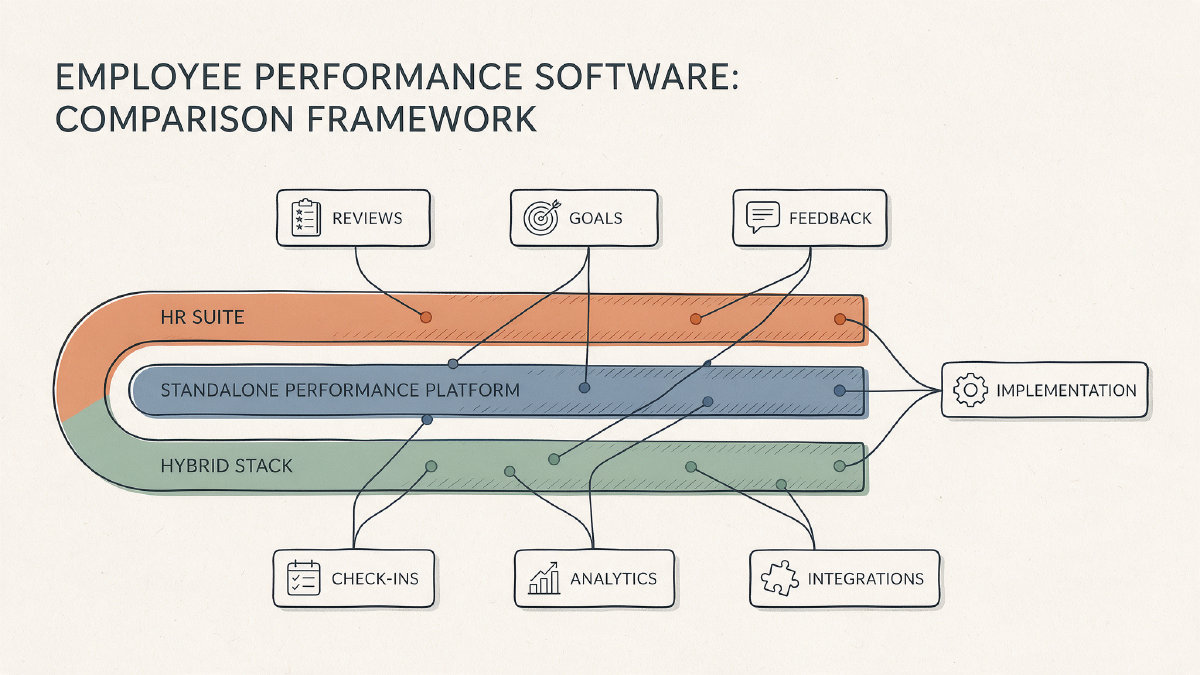
HR-suite or HRIS-embedded performance tools vs. standalone specialist products
There are two broad categories of performance management software: HR-suite or HRIS-embedded performance tools and standalone specialist products. Each has its own advantages and disadvantages.
HR-suite or HRIS-embedded performance tools are usually easier to use because they’re built into a larger HR platform. They also tend to have better integration capabilities because they’re built around the same data model as the rest of your HR system. However, they typically lack the depth of functionality that more specialized tools offer.
Standalone specialist products are usually more powerful than HR-suite or HRIS-embedded performance tools, with deeper workflows for reviews, goals, feedback, analytics, or manager development. Their integration capabilities can still be strong, but those connections usually have to be built and maintained separately rather than sharing the same data model natively. They can also be harder to administer because they’re not built into a larger HR platform.
Which type of performance management software is best for your company depends on your needs. If you need a simple, easy-to-use solution, an HR-suite or HRIS-embedded performance tool might be the best choice. If you need a more powerful solution, a standalone specialist product might be the best choice.
Commonly discussed platforms
Here are some of the most commonly discussed platforms for performance management:
BambooHR — an HR-suite option with performance management built around employee records. Its published materials emphasize review cycles, self/manager/peer/skip-level feedback, goals, one-on-ones, reminders, reports, mobile access, and segmentation by department, location, and job title. Treat this as a suite-native fit rather than assuming it has specialist depth in every talent workflow.
Lattice — commonly considered a performance-first specialist platform for structured reviews, goals/OKRs, feedback, 1:1s, calibration, and compensation-related workflows. It has been adding HRIS capabilities, but scope and availability should be confirmed for your market and plan.
15Five — a specialist option centered on check-ins, continuous feedback, manager coaching, goals, reviews, and recognition. It is not a core HR system, so HRIS support depends on connectors rather than a native shared record.
Culture Amp — best known for engagement surveys, people analytics, benchmarking, and listening, with performance reviews, goals, feedback, and 1:1 support also available. Verify which performance and HRIS-integration features are included in each tier.
Leapsome — a broader people-enablement option covering performance reviews, goals/OKRs, engagement, instant feedback, learning, competencies, meetings, compensation, analytics, and increasingly HRIS functions. Its feature breadth can be useful, but modules, language coverage, support, and pricing still need to be checked against the quoted package.
For each vendor, compare the quoted plan and module scope, per-user or custom pricing, geographic and language availability, and limitations such as missing core HR features, weaker suite-native depth, integration fees, support tiers, or analytics that only appear in higher packages.
Integration diligence
Before you choose a performance management software, you should make sure that it integrates with your existing HRIS. You should also make sure that it supports the exact employee-data model that you’re using. You should also make sure that you understand the sync direction — whether your data flows from your HRIS to the performance management software, or vice versa. Finally, you should make sure that you understand the suite modules and separate connectors that your performance management software uses, and whether there are any possible fees associated with them.
Implementation and adoption risk
When choosing a performance management software, you should also consider the implementation and adoption risk. You should examine how everyday usability looks in practice, whether your managers and employees are ready to adopt the new software, and whether the vendor provides assistance during setup. You should also look at the quality of support provided by the vendor, and whether the software features are bloated. Finally, you should consider whether your organization is able to sustain the performance management cycles after launch.
Reporting and analytics
You should assess reporting and analytics against concrete internal uses. Operational review and goal visibility are probably the top two priorities, but deeper segmentation, benchmarks, and workforce analytics may not be needed by every team.
Security and data-handling due diligence
You should lay out security and data-handling due diligence for each finalist. Treat vendor-specific credentials as claims to verify, rather than assumptions that transfer across products.
Fit-based decision path for small and growing teams
Small and growing teams may benefit from a fit-based decision path. Map your process maturity, HRIS context, complexity, manager capability, integration burden, support needs, and adoption capacity to the suite, specialist, or hybrid choice.
Vendor-question framework
Use the checklist as a question sheet for each finalist, and ask the vendor to confirm the answers in writing:
- Process fit: Can it support your review types, cadences, self, manager, peer, skip-level, and 360 feedback, goal model, one-on-one workflow, and audience segments without custom development?
- Modules: Which capabilities are included in the quoted plan, and which require separate modules for goals, engagement, compensation, learning, analytics, mobile access, or HRIS functionality?
- Integration behavior: Is there a pre-built connector for your HRIS, what employee and manager data syncs, is the sync one-way or bidirectional, how often does it run, and what happens to historical data if the connection breaks?
- Analytics: Which operational, completion, goal, trend, segmentation, benchmark, and workforce reports are included, and can they be exported or restricted by role?
- Support and adoption: What onboarding, training, administrator support, manager enablement, launch materials, response times, and ongoing customer-success resources are included?
- Security and data handling: What security certifications does the product claim, where is data stored, how is access controlled, what is the retention and deletion policy, and how are sub-processors and incident notification handled?
- Commercial terms: What is the per-user or flat price, billing term, annual minimum, implementation fee, connector fee, module add-on cost, renewal pricing, and cancellation policy?
For example, if you’re looking for a performance management software that fits your current processes, you’d want to ask the vendor if their module fits your current workflows. You’d also want to ask the vendor if they can customize their review cycle to match your current processes. You’d also want to ask the vendor if they can integrate with your HRIS. You’d also want to ask the vendor if they can synchronize with your HRIS. You’d also want to ask the vendor if they charge extra for integration. You’d also want to ask the vendor if they provide mobile access to your performance management software. You’d also want to ask the vendor if they allow you to segment your audience. You’d also want to ask the vendor if they provide support. You’d also want to ask the vendor if they provide training. You’d also want to ask the vendor if they have certifications. You’d also want to ask the vendor if they have data retention policies. You’d also want to ask the vendor if they have plans available.
For example, if you’re looking for a performance management software that fits your current processes, you’d want to ask the vendor if their module fits your current workflows. You’d also want to ask the vendor if they can customize their review cycle to match your current processes. You’d also want to ask the vendor if they can integrate with your HRIS. You’d also want to ask the vendor if they can synchronize with your HRIS. You’d also want to ask the vendor if they charge extra for integration. You’d also want to ask the vendor if they provide mobile access to your performance management software. You’d also want to ask the vendor if they allow you to segment your audience. You’d also want to ask the vendor if they provide support. You’d also want to ask the vendor if they provide training. You’d also want to ask the vendor if they have certifications. You’d also want to ask the vendor if they have data retention policies. You’d also want to ask the vendor if they have plans available.