
How to build a survey that actually tells you something useful about how your employees feel.
When I was at the Gallup organization, we used employee engagement surveys as a way to learn what people thought about their work. We called it “employee engagement,” but in practice it was just a structured feedback process — like a customer satisfaction survey, but for employees instead of customers. The idea was that if we could measure things like motivation, commitment, discretionary effort, emotional connection, and recommendation (what Gallup calls the “Q12”), then we could get an idea of whether our workplace conditions were good or bad.
In other words, engagement outcomes are not simply about pay or benefits contentment. They’re more nuanced than that, and they involve both thinking and feeling. Gallup’s Q12 is designed to measure these kinds of outcomes.
Gallup has some great resources on how to use this data, but here I want to focus on the practicalities of building an employee engagement survey from scratch. This article will walk through the process of setting up a survey that actually tells you something useful about how your employees feel.
Set Survey Goals
First, HR should set goals before drafting questions. What decisions and actions do you want to make based on this survey? And what kind of data do you need to support those decisions and actions? Once you know what you want to do with the results, you can decide what items to include in the survey. You don’t need to collect every possible HR topic — just the ones that relate directly to the outcome measures you’ve decided to track.
The key thing is to separate outcome items from driver items. Outcome items are the things you’re measuring; driver items are the things that affect the outcomes. In most cases, the outcome items will be things like engagement index scores, while the driver items will be specific aspects of the workplace environment that influence engagement. For example, if you’re trying to improve engagement, you’ll probably want to ask about expectations, resources, recognition, manager support, communication, development and growth, voice, culture, leadership, and work conditions. These are all things that can be changed by management action.
But you might also want to ask about career growth, compensation, benefits, flexibility, safety, and inclusion — these are all important things, but they’re less actionable. If you have a very small company, you might even want to ask about everything. But if you have a larger company, you’ll probably find that asking everyone about everything doesn’t lead to much meaningful insight. Instead, you should focus on the few drivers that are most relevant to your company’s current situation.
Design Survey Items
Once you’ve decided which outcome items to measure and which driver items to ask about, you can start designing your survey. There are two main types of survey items: rating-scale items and open-ended items. Rating-scale items are easy to score and interpret, so they’re a good place to start. Open-ended items are harder to score, but they give you more detailed information about what people think.
Most companies use a 5-point Likert agreement scale for rating-scale items. This means that respondents choose between five options that indicate their level of agreement with each statement. The options are usually labeled “Strongly Disagree”, “Disagree”, “Neither Agree nor Disagree”, “Agree”, and “Strongly Agree”. It’s important to label the non-agreement rating items clearly so that people know what they’re being asked to rate.
Open-ended items are optional, but they should supplement rather than replace rating-scale items. A good rule of thumb is to include no more than a few open-ended items per section of the survey. Too many open-ended items will make the survey too long and too time-consuming for participants.
Choose Survey Cadence
There are two main types of employee engagement survey rhythms: census and pulse. Census surveys are comprehensive surveys that cover all employees. Pulse surveys are shorter surveys that are distributed frequently. Census surveys are typically done annually or biannually, while pulse surveys are done quarterly or monthly.
HR should choose a cadence based on the first benchmark, follow-up capacity, and visible action rather than constant asking. The initial survey should serve as an internal benchmark. Full surveys should be done annually or biannually. Quarterly pulses are a good option for organizations that want to monitor changes in engagement over time. Six-month follow-ups are a default cadence for most companies.
Gallup recommends conducting an initial survey to create benchmarks and then surveying every six months. Consistency and follow-through are important when conducting any type of survey.
Privacy and Participation
A privacy setup is necessary for launching an employee engagement survey. Anonymity versus confidentiality is an important distinction to understand. Anonymity refers to the fact that the responses are not linked to individual employees, while confidentiality refers to the fact that responses containing identifiable information are protected and access is controlled. Pre-distribution settings should be enabled before distributing the survey to employees. No names or email addresses should be included in the survey. Avoid identifying combinations of demographics that could reveal an individual’s identity. Suppress small reporting slices to protect anonymity.
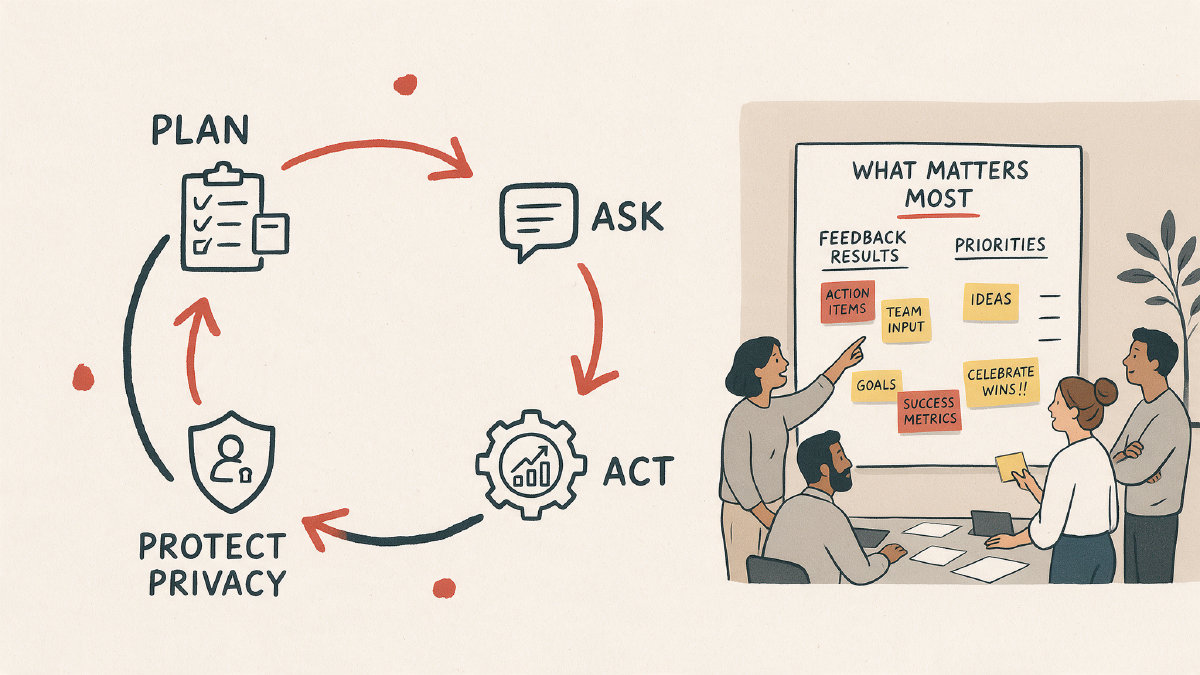
Leaders can support participation in the survey by building trust before the survey, explaining the purpose and use of the results, actively endorsing the survey, explaining the anonymity of the survey, setting expectations, training managers to discuss the results, and showing employees that feedback leads to action.
Scoring and Interpretation
Scoring and interpreting the survey results involves looking at theme averages, calculating an overall engagement index, comparing groups, reading trends, looking at open-text context, and understanding the limits of template score bands. Theme averages are calculated by averaging the scores of each theme across all respondents. An overall engagement index is calculated by averaging the scores of all themes. Group comparisons can be made using filters, compare rules, crosstabs, and the Results Dashboard. Trend reading involves looking at how the scores change over time. Open-text context provides qualitative insights into why people gave certain scores. Template score bands are not universal benchmarks, and must be interpreted in the context of the company’s own situation.
After the survey results are in, HR should report transparently, narrow down to priorities, assign ownership, track concrete actions, and measure movement with a short pulse. High-level results should be shared broadly with employees. Only a few priority themes should be selected for further analysis. Low scores should be addressed first. Leaders and managers should own the action plans. Concrete trackable next steps should be assigned. Visible communication of actions should be used to keep employees informed. A short follow-up pulse should be used to measure progress.
Templates and Vendor Options
A self-serve template is sufficient for smaller companies that want to conduct a quick internal launch of an engagement survey. Larger companies may prefer a validated benchmarked product or vendor. Ready-to-use customizable templates are fast and easy to implement. Proprietary validated items are available for external benchmarking. More than 350 research-backed questions are available for census and pulse surveys. Manager action-planning tools are available for leaders and managers. Consulting support is available for implementation assistance. Gallup Access offers real-time results for global benchmarking. Industry, competitor, and top-quartile comparisons are available for benchmarking. Role, region, and team segmentation are available for analyzing the results. Q12 exact items are proprietary and cannot be used without permission. Fewer than 100 employees can use the one-time option. 100 or more employees should hire a consultant to help them use the software effectively.
To evaluate a software or vendor for employee engagement surveys, start with organizational needs and current written verification. Look for validated methodology, customization that preserves comparability, availability of benchmarking and methodology, anonymity controls and reporting thresholds, dashboard and segmentation, manager action planning, pulse support, integration needs, implementation support, fit for organizational size, contract terms, and current written verification.